Sofabaton X2 Review: Real User Experience After 3 Months
I've been using the Sofabaton X2 as my primary living-room remote for roughly three months now, and I wanted to share a detailed, honest account of how it performed in real day-to-day use. I bought the X2 to replace a jumble of remotes — TV, AVR, streaming stick, and soundbar — and to see whether a modern learning universal remote could actually simplify my life instead of adding another gadget to the coffee table.
Why I chose the Sofabaton X2
In my experience, the appeal of the X2 came from its promise of learning IR codes, Bluetooth support for some smart devices, rechargeable battery, and an app-driven setup that supposedly made customizing buttons and macros straightforward. I wanted a single remote that felt solid in hand, handled both older IR-only gear and newer Bluetooth-capable devices, and let me create a predictable "watch TV" macro that powers on the TV, switches the AVR input, and launches my streaming stick — with one button press.
First impressions and build quality
Out of the box the X2 felt compact and reasonably well-balanced. The plastic is matte and doesn't attract fingerprints quickly, and the buttons have a satisfying travel — not mushy but not overly clicky. I appreciated that it's light enough to hold for extended channel surfing but not so light that it felt cheap. The layout makes sense to me: a directional cluster, volume/channel rocker, a row of programmable buttons, and a dedicated macro/activity button. The status screen (small, to-the-point) shows the current device and battery level without getting in the way.
Setup and initial configuration
Setting up the X2 took me longer than the marketing videos make it look, but it was not painful. I installed the companion app, paired the remote (Bluetooth), and started adding devices. What I found was:
- I could add mainstream devices — my smart TV, AVR, and streaming stick — using the app's device database quickly.
- For one older AVR and a legacy DVD player, the IR learning feature saved the day. I held the old remote up to the X2 and taught it a handful of key commands.
- Pairing Bluetooth devices (a soundbar and my streaming stick remote) worked but required the remote and devices to be very close and sometimes a restart of the app. Once paired, control was stable.
One thing that bothered me early on was that the app occasionally felt sluggish — not crash-prone, but a little slow when browsing the device list. Also, the X2 doesn't automatically detect every obscure brand; sometimes I had to try several codes before finding the right profile. That said, the learning function reliably captured commands that the database lacked.
Daily use: ergonomics, responsiveness, and reliability
After three months, the X2 replaced four remotes on my coffee table. Here are the specific day-to-day observations I think matter to someone considering this device:
Looking for the best Electronics deals on Amazon?
Shop Amazon →Ergonomics and physical controls
I've been using the X2 for long viewing sessions and found it comfortable. The button placement favors thumb-first operation, so I rarely had to shift my grip. The most-used buttons (volume, channel, back) are easy to hit without looking. I liked that the macro button is prominent and quick to access; pressing it to run my "Evening Movie" macro became second nature.
Responsiveness
IR commands fire instantly and reliably at short to medium distances; the remote handles typical living-room ranges (8–10 feet) without issue. Bluetooth control for the soundbar and streaming player is generally responsive once connected, though there were two or three times where the remote took an extra second to register a press via Bluetooth. These hiccups were infrequent enough that they didn't become annoying, but they exist.
Battery life
One big win for me was battery life. I get around 10–14 days on a single charge with moderate use (several hours of TV per evening, occasional setup tweaks). The X2 charges via USB-C and reaches a usable level quickly; a 30–45 minute top-up would carry me through a busy evening. I liked not having to swap disposable batteries and that I could plug it into a small USB charger on the side table at night.
Learning and device coverage
In my experience, Sofabaton's device database covered most major brands out of the box. For older or niche equipment, the IR learning function worked exactly as advertised: point existing remote at the X2 and press the command; the X2 records and maps it. I appreciated being able to keep unique power-on sequences or obscure input toggles that don't exist in modern device profiles.
Macro and activity behavior
Creating a macro was straightforward in the app: pick the devices and the commands (including delays), and push it to the remote. My "Evening Movie" macro turns on the TV, turns on the AVR, switches AVR input, and then launches the streaming stick. In practice, it usually works on the first try. Occasionally one device would not respond to a command in the sequence, which required me to increase the delay between commands for reliability. Once tuned, the macros have been rock solid.
App experience and remote-side control
The app is necessary for advanced setup and macros. In my use, basic control works without the app after setup, but anything beyond adding devices or editing macros requires it. The app's UI is functional but not slick: device selection screens are sometimes cluttered, and I ran into a small learning curve on how macros are structured (order matters, and the default delays are conservative). A few updates during my three months improved stability, which was reassuring.
Looking for the best Electronics deals on Amazon?
See Deals →Specific things I appreciated
- Solid learning function: taught the remote legacy commands I couldn't find in the database.
- Good battery life: USB-C charging and two-week-ish runtime with moderate use.
- Comfortable feel: button travel and layout make the remote pleasant to use for long sessions.
- Macros are powerful: once I tweaked delays, they automated multi-device startups reliably.
- Compact footprint: replaced multiple remotes and cleared clutter on my coffee table.
Specific disappointments and annoyances
- Occasional Bluetooth lag: rare but noticeable delays for Bluetooth-controlled devices.
- App sluggishness at times: setup and editing felt slower than I'd like.
- Profile hunting: had to try several database entries for one legacy AVR before giving up and learning manually.
- No perfect “set and forget” initial experience: required a couple of evenings of setup and delay tuning to be flawless.
Comparison: Sofabaton X2 vs alternatives
| Sofabaton X2 | Logitech Harmony Elite (reference) | Generic Learning Remote | |
|---|---|---|---|
| Ease of setup | Moderate — app-based, sometimes trial-and-error | Moderate — robust database, cloud support | Easy for basics, harder for complex devices |
| Device support | Strong for mainstream; IR learning for legacy | Very strong historically, including smart home integrations | Usually IR-only and limited database |
| Battery | Rechargeable USB-C, ~10–14 days | Rechargeable dock; similar multi-day life | Disposable batteries — variable |
| App quality | Functional but occasionally sluggish | Mature, polished (when supported) | Often basic or absent |
| Macro support | Yes — reliable after tuning | Yes — very flexible | Limited or none |
| Price/value | Good value for the feature set | Higher price but feature-rich | Low cost, limited features |
Buying guide: Is the Sofabaton X2 right for you?
If you're considering the X2, here are practical points to help you decide and tips based on my three months of use.
Who should buy the X2
- You own a mix of modern and older AV gear and want to consolidate remotes.
- You value rechargeable convenience and don't want to deal with disposable batteries.
- You want macros/activities to automate multi-device power-up sequences.
- You prefer a compact remote with physical buttons rather than an all-touchscreen device.
Who might look elsewhere
- You need flawless out-of-the-box control for very obscure professional AV equipment; a commercial AV controller may be better.
- You want deep smart-home integrations (scenes across many brands) that rely heavily on specific cloud platforms and voice assistants; the X2 is focused on device control, not broad smart-home orchestration.
- You dislike using companion apps for setup — if you insist on zero app interaction, a basic universal remote may be more suitable.
What to check before you buy
- Confirm the remote supports the protocols your devices use (IR for older devices, Bluetooth if needed for smart remotes).
- Make sure you're comfortable with an app-driven setup. If possible, read a few user reports about the app's current state.
- Think about how many macros or activities you want — if you're planning a lot of complex sequences, be prepared to spend some time fine-tuning delays and command order.
- Check charging method — I appreciated USB-C for convenience.
Practical setup tips I learned
- Give each macro a little extra delay between device commands during setup; it's easier to shorten delays later than to lengthen them when a device misses a command.
- When learning IR codes, position both remotes close and steady; I found inconsistent positioning caused failed learns.
- Label the programmable buttons with short names in the app so you don't forget what custom buttons do after a few weeks.
- Keep firmware and app updated — I saw small reliability improvements after a firmware/app update during my usage window.
Final thoughts and conclusion
After three months, the Sofabaton X2 feels like a worthwhile upgrade from juggling four remotes. In my experience, it hit the most important marks: it consolidated devices effectively, learned former remotes' obscure commands when needed, and offered macros that genuinely saved me time and frustration when starting a movie night.
It isn't perfect. The app could be snappier, Bluetooth control had the occasional lag, and the initial setup required patience and a couple evenings of tweaking. But what I found was that the payoff — one remote that reliably runs my living-room setup — outweighed those short-term setup frustrations.
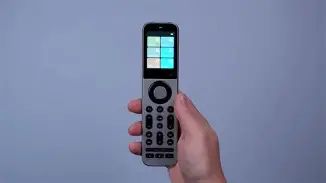
If you want a physical-button remote with modern conveniences like rechargeable power and strong IR learning, and you don't mind spending a little time tuning macros, the X2 is a compelling, practical option. In my experience it's removed a lot of small daily annoyances and made controlling my home theater simpler and more predictable. I still keep one original remote tucked away for rare edge cases, but for 95% of my viewing I reach for the X2 first.