Ideapad 5 15 2021 Review: Real User Experience After 3 Months
Introduction — why I bought the Ideapad 5 15 (2021)
I've been using the Lenovo Ideapad 5 15 (2021) as my daily driver for roughly three months now. I bought it because I wanted a straightforward 15-inch laptop that balanced portability, battery life, and enough performance for productivity work and casual media use. My unit is the AMD configuration (Ryzen 7, 16GB RAM, 512GB NVMe SSD, 15.6" FHD IPS), which is the spec I'll reference most often. In my experience, this model sits squarely in the midrange — not flashy, but promising on paper. What I wanted to find out in real life was whether it could replace a slightly older ultraportable without sacrificing comfort or battery life.
First impressions and design
Out of the box, I noticed the Ideapad 5's understated aesthetic. The chassis is a soft-touch matte plastic with a muted gray finish that doesn't attract fingerprints the way glossy plastics do. I was surprised by how well the lid resists smudges — that mattered to me because I carry the laptop in a backpack daily. The hinge feels solid and has a little resistance so the screen doesn't wobble during typing, which I appreciated. The laptop is not ultralight, but it's lighter than many 15-inch budget machines I've carried before; I can comfortably slide it into my bag for a commute.
One practical detail I liked immediately: the power button with an integrated fingerprint reader on my unit. It speeds up login and I found it reliably recognized my print even after sweaty commutes. The chassis flex is minimal around the keyboard deck, although pressing hard in the center will cause a little give — not a deal breaker, but noticeable if you look for it.
Display and audio — daily media use
The 15.6" Full HD IPS panel is decent for the price. Colors are reasonably accurate out of the box for web browsing, streaming, and document work. I calibrated the display a bit for photo editing and found it acceptable for casual image work, but it's not a professional panel — the color gamut and peak brightness are mid-tier. What I found was that the display's matte finish reduces glare in bright rooms, which I prefer over reflective glass in a laptop I use in cafés and trains.
Text is crisp at 1080p on a 15.6" screen, and viewing angles are wide enough that two people can comfortably look at the screen together. My only real annoyance was the display's 60Hz refresh rate: scrolling can feel slightly less fluid compared with 90–120Hz displays. For me, this mattered only occasionally (mostly during long document scrolling or web browsing sessions), but gamers will notice the difference.
Speakers are loud enough for casual video calls and background music, but they lack low-end depth. I noticed distortion at higher volumes in bass-heavy tracks. I usually connect headphones for anything audio-critical, so this only affected me when I forgot to bring my headphones.
Performance — productivity, light creative work, and thermals
In daily use, the Ryzen 7 configuration has been snappy. I've been using this laptop for a mix of browser tabs (10–20 tabs usually open), Slack, Zoom calls, document editing, and occasional light photo editing in Lightroom. The machine handled those tasks without stuttering. Boot times are quick thanks to the NVMe SSD, and waking from sleep is instant most of the time.
For a few weekends I used the Ideapad to transcode short videos and perform batch photo exports. What I found was that the CPU can sustain decent performance for short bursts, but under long, heavy workloads the laptop gets warm on the underside and the fans ramp up. The fans are audible but not obnoxious; they produce a steady hum that fades into the background in a moderately noisy room. If you plan to do heavy video editing regularly, expect thermal throttling that will reduce peak performance compared to larger laptops with higher thermal budgets.
Light gaming — think indie titles and older AAA games at medium settings — was doable. I was able to play Rocket League and Stardew Valley comfortably; modern, demanding titles required turning down settings and accepting 30–45 FPS. If gaming is a primary use case, a dedicated GPU model or a different machine would be a better fit.
Shop the latest Electronics picks on Amazon.
Browse Now →Real-world benchmarks and feel
I did a few informal tests: exporting a 5-minute 1080p H.264 video using my preferred editor took noticeably longer than on my friend’s 14-inch laptop with a dedicated GPU, but it finished cleanly. Multitasking between a dozen Chrome tabs and a virtual meeting rarely pushed CPU utilization above 60–70%, so everyday responsiveness felt solid. Overall, performance aligns with my expectations from an efficient Ryzen mobile chip in a mid-thin chassis.
Keyboard, trackpad, and input experience
The keyboard is one of the Ideapad 5's best surprises for me. The key travel is about medium depth with a slightly firm bottom-out that I enjoy for long typing sessions. I've written several long drafts and didn't experience the hand fatigue I had on some thinner laptops. The keycaps have a slight texture that helps with grip. My unit includes a number pad; I don't use it often, but it's nice for spreadsheets.
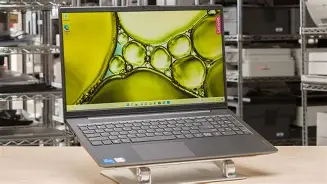
The trackpad is wide and glass-like in feel. Windows Precision drivers make gestures smooth and reliable. I only occasionally noticed the pointer lag when I had many background tasks running, but under normal conditions it's accurate and responsive. The placement of the trackpad leaves ample palm-rest space, and accidental palm taps were rare.
Battery life and charging — what I actually experienced
Lenovo advertises long battery life for the Ideapad 5 line, and my experience was generally good but situational. For light work (email, text editing, and a few browser tabs) I commonly got between 8–10 hours of real-world use on a single charge with the brightness around 40–50%. For mixed usage including a couple of video calls and more tabs, I saw closer to 6–7 hours. When doing CPU-heavy tasks like long exports, battery dropped quickly and I needed to keep the charger handy.
Charging with the included 65W adapter is brisk — you can get a 0–50% charge in roughly 30–35 minutes under typical conditions. I liked that Lenovo included a fairly compact charger that fits nicely in my bag. One practical note: the charging port is on the left side and shares space with other ports, so using several bulky USB-A devices and the charger at once can feel crowded.
Ports, connectivity, and expandability
I appreciated the Ideapad 5's balanced port selection. My unit includes USB-C (with display/charging support), two USB-A ports, HDMI, an SD card reader, and a headphone jack. That SD card slot came in handy when I imported photos from a camera on the go. I used the USB-C port to connect to an external monitor with no issues. Wi-Fi 6 support in my model was solid — I noticed fewer hiccups on congested home networks compared to older machines.
Internally, the RAM on many Ideapad 5 configurations is soldered (mine has a single SO-DIMM plus soldered RAM giving a total of 16GB), so check the exact SKU if you think you'll upgrade later. The SSD is replaceable in most models, which I appreciated because storage can be an easy upgrade down the line.
Software, bloatware, and updates
The Ideapad arrived with Windows 10 (I upgraded to Windows 11 during my testing) and a few Lenovo utilities. There was minimal bloatware — just a couple of preinstalled apps from Lenovo and a trial office suite. I removed the ones I didn't use and left Lenovo Vantage for system updates and battery settings. Vantage made it straightforward to toggle performance profiles and check for BIOS and driver updates. In my experience, keeping a machine up to date with these vendor tools made a noticeable difference in stability and battery behavior.
Shop the latest Electronics picks on Amazon.
Shop Amazon →Longevity and daily durability
After three months of carrying it around and everyday use, the Ideapad 5 shows light wear on the bottom edges but nothing worrying. The hinge has stayed tight and the keys have not developed shine or looseness. I did notice the screen hinge collects dust where the bezel meets the case — a small annoyance if you like your devices perfectly clean.
One thing that bothered me early on was the tendency for the vents to gather lint if I set the laptop on soft surfaces. I learned to avoid working on a bed or couch for long periods during heavy workflows, which reduced fan noise and helped keep thermals sensible. If you treat the machine like a daily commuter laptop, it should hold up fine for a couple of years at least; for heavy pro workloads, I'd expect it to be a stopgap rather than a long-term high-performance workstation.
Pros & Cons
- Pros:
- Comfortable keyboard for long typing sessions
- Good real-world battery life for productivity (6–10 hours depending on use)
- Balanced port selection including SD card reader and HDMI
- Solid build with soft-touch finish and minimal fingerprints
- Fast NVMe SSD and snappy everyday performance on the Ryzen model
- Fingerprint reader integrated into power button for quick logins
- Cons:
- Thermals limit sustained heavy workloads — fans get loud under extended load
- Display is fine but not great for color-critical work (average brightness and gamut)
- Speakers lack bass and distort at high volumes
- RAM upgradeability varies by SKU — soldered memory on some models
- 60Hz display means less fluid scrolling compared to higher-refresh alternatives
How it compares — quick table
| Model | Typical CPU | RAM (typical) | Display | Battery I saw | Best for |
|---|---|---|---|---|---|
| Lenovo Ideapad 5 15 (2021) | AMD Ryzen 5/7 mobile | 8–16GB (varies by SKU) | 15.6" FHD IPS (60Hz) | 6–10 hours (light to mixed) | Daily productivity, students, commuters |
| Acer Swift 3 (comparable) | Intel/Ryzen ultramobile | 8–16GB | 14"–15.6" FHD IPS | 7–11 hours | Ultra-portable with similar performance |
| Asus VivoBook S15 (comparable) | Intel Core i5/i7 | 8–16GB | 15.6" FHD, sometimes glossy | 6–9 hours | Style-focused users who want more visual flair |
| MacBook Air (M1) | Apple M1 | 8–16GB unified | 13.3" Retina (higher PPI) | 10–15 hours | Ultra-long battery and light creative work |
Buying guide — what to look for if you're shopping
If you're considering an Ideapad 5 15 (2021) or a similar 15-inch midrange laptop, here are the practical choices I would make based on my use:
- Choose the right CPU: If you do a lot of multitasking or light creative work, go for the Ryzen 7 configuration. For strictly office work and browsing, Ryzen 5 (or Intel Core i5) is fine and saves money.
- Get 16GB RAM if possible: I've found 16GB keeps the machine feeling responsive when I have many browser tabs and background apps open. If your SKU has soldered RAM, make sure the total is what you need — upgrading later might not be possible.
- Prefer NVMe SSD: The SSD makes a huge difference in boot and app launch times. A 512GB NVMe gives a comfortable balance of speed and space for most people.
- Check the display variant: Some regions offer slightly different panels. If color work matters, try to find a unit with a higher-quality IPS panel; otherwise, matte FHD is the pragmatic choice for everyday use.
- Look for an SD card reader and HDMI: If you move files from cameras or connect to external displays regularly, these ports are convenient. A USB-C with display support is also handy for docking.
- Consider warranty and accidental damage coverage: If you travel a lot with the laptop, investing in a modest warranty extension or accidental coverage can save headaches later.
Final thoughts and conclusion
After three months with the Ideapad 5 15 (2021), what I found was a reliable, well-rounded laptop that excels at the tasks most people actually do every day: writing, web browsing, streaming, and light content creation. The keyboard and battery life are the features I consistently enjoyed; the keyboard makes long work sessions pleasant and the battery rarely forced me to be tethered to a charger. I was surprised by how useful the SD card slot turned out to be and by the overall polish of the Windows experience after a few firmware and driver updates via Lenovo Vantage.
On the other hand, the machine does show its midrange roots when pushed: sustained heavy workloads produce heat and throttling, speakers are mediocre, and the 60Hz display lacks the silky-smooth feel of higher refresh panels. These aren't deal-breakers for my use, but they're worth knowing if your work leans toward continuous heavy CPU/GPU tasks.
In my experience, the Ideapad 5 15 (2021) is a strong choice if you want a comfortable, practical 15-inch laptop that won't break the bank, handles day-to-day productivity with ease, and remains portable enough for commuting. If you need a powerhouse for video editing or gaming, I'd recommend looking at machines with larger thermal designs or discrete GPUs. For everyone else — students, remote workers, and casual creators — this laptop delivers sensible performance and value based on how I've used it over the last three months.